
Subscriptions
See every recurring plan, find failed or unpaid renewals, pause, resume or cancel a patient's subscription, and set a product up to renew automatically.
Subscriptions lists every recurring plan your patients are enrolled in, including prescription programs, and flags renewals that failed or are unpaid. One-time purchases stay in Orders. Left menu → Subscriptions. Client Admin; Client Staff once a Client Admin ticks Manage subscriptions in Settings → Staff permissions.
What you can do here
- See whose renewal failed or is unpaid
- Pause, resume or cancel a subscription
- Sell a product as a subscription
See whose renewal failed or is unpaid
Use this once a week, or when a patient's refill did not arrive.
Read the Needs attention tile
It counts renewals that failed to charge and renewals waiting for the patient to pay, for example 2 payments failed · 1 awaiting payment.
List them
Open All statuses and pick Payment failed or Payment due. Next event on each row says what happens next, such as Last charge failed — the patient must update their card. Click a row to open the patient.
You'll know it worked when the table shows only the plans that need you. Contact those patients: a failed card is fixed by the patient, who then resumes the plan from their portal; a payment due is paid from their portal's Subscriptions page.
Who can do this: Client Admin, and Client Staff with the permission.
Pause, resume or cancel a subscription
Use this when a patient asks to skip, stop or restart their plan.
Open the row menu
On the patient's row, click the menu and choose Pause subscription, Resume subscription or Cancel subscription.
Confirm
Click Pause, Resume or Cancel subscription in the dialog.
You'll know it worked when the toast reads Subscription paused., Subscription resumed. or Subscription cancelled. and the status changes.
Who can do this: Client Admin, and Client Staff with Manage subscriptions. The same menu is on the patient's profile: click the subscription badge next to their name.
Pausing stops charges and new renewal orders. Resuming starts a fresh cycle that day, with no back-billing. Cancelling is permanent: the patient must enroll again. Cancelling or fully refunding the first order also ends the plan. Orders already created keep going; cancel them on Orders.
Sell a product as a subscription
Use this to bill a patient on a schedule, for example monthly GLP-1 or TRT.
Open the product
Left menu → Products, row menu → Edit details. Stay on Overview.
Turn it on
Switch on Subscription product, then set Every and Period (for example 1 Month(s)).
Choose checkout options
Tick Subscription, One-time purchase, or both to let patients choose.
Choose how renewals are paid
Switch on Charge the saved card automatically to charge the card saved at checkout. Leave it off to have the patient pay each renewal from their portal.
Save
Click Save.
You'll know it worked when patients see the subscription option at checkout, and their plan appears here once they enroll.
Who can do this: Client Admin.
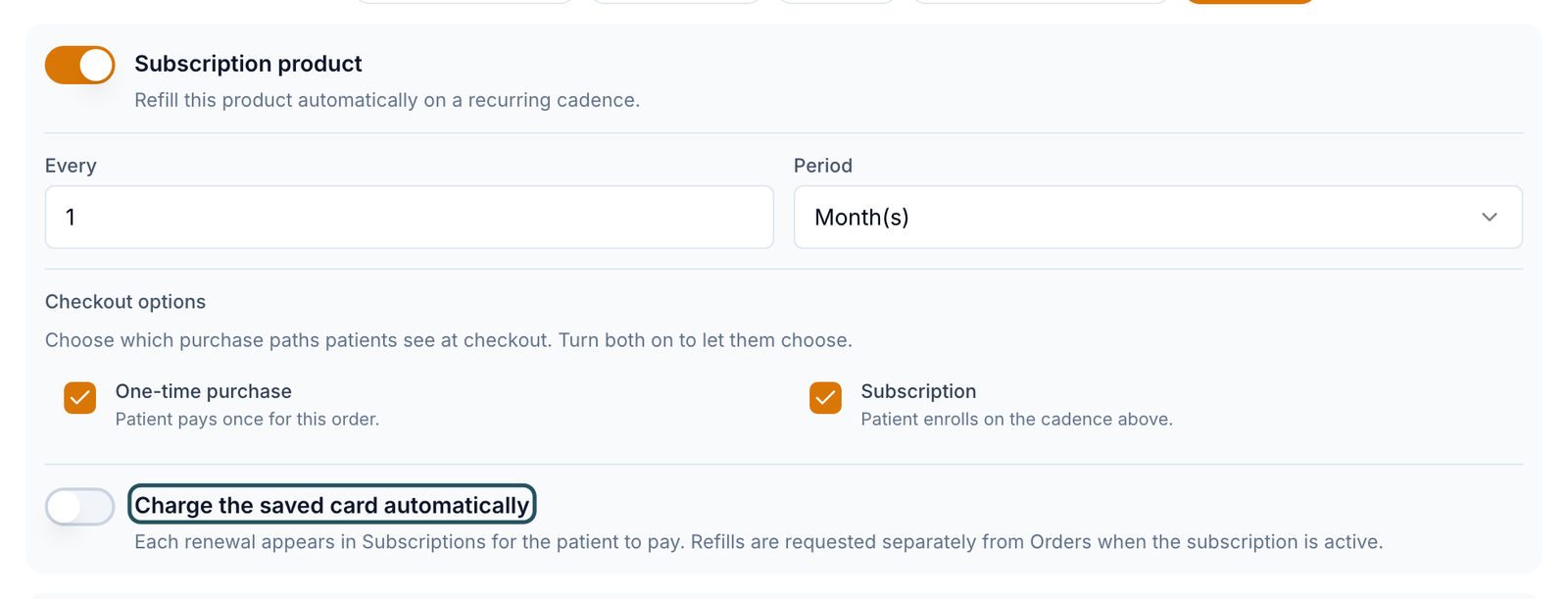
Selling online: use Charge the saved card automatically. Patients paying each renewal online works only with Stripe. In a clinic: a subscription product is the closest thing to a membership; there is no separate membership feature.
What's on this page
| Control | What it does |
|---|---|
| Recurring revenue | Every active plan's price converted to a 30-day amount and added up. A run rate, not money collected. |
| Renewing in 7 days | Active plans that renew within a week. |
| All billing | Saved card or Invoiced (patient pays each renewal). |
| Export CSV | Downloads the rows shown. |
Statuses you'll see here
| Status | What it means | Who acts next | What you do |
|---|---|---|---|
| Active | Renews on the date in Next event | No one | Nothing |
| Payment due | Renewal waiting for the patient to pay; it waits until they do | Patient | Remind them |
| Payment failed | The saved card was declined; no automatic retry | Patient | Ask them to update the card and resume |
| Payment method needed | Paused: no reusable card was saved at checkout | Patient | Ask them to save a card |
| Paused | No charges or orders until resumed | Your team or patient | Resume subscription |
| Cancelled | Ended for good | No one | Patient re-enrolls to restart |
What can go wrong
| What you see | Why | Fix |
|---|---|---|
| A subscribed patient isn't listed | They bought the one-time option, or Subscription wasn't ticked under Checkout options. | Check the order on Orders; fix the product; the patient enrolls on their next purchase. |
| New plans show Payment method needed | Your processor didn't keep a reusable card. NMI, SimPay and SlidePay need Customer Vault. | Turn on Customer Vault in your gateway, then ask patients to save a card. |
| Patient can't pay a Payment due renewal | Online renewal payment is only supported for Stripe at this time. | Switch the product to Charge the saved card automatically. |
| A 3-month plan bills monthly | Every and Period are wrong, often on a duplicated product. | Set Every 3, Period Month(s) and save. |
| Help under Charge the saved card automatically says refills are requested separately from Orders | Known problem: that text is out of date. | Nothing to do: each paid renewal creates its order automatically. |
| Client Staff have no Subscriptions menu | Manage subscriptions is off. | A Client Admin ticks it in Staff permissions. |
Questions people ask
Does a subscription ship the refill automatically?
Each paid renewal creates that cycle's order for you. The order follows your product's usual refill rules (forms, labs or a visit if required), then goes to the provider and pharmacy.
How are refill reminders different?
Refill reminders only message the patient; they never charge. Set them on the product's Refill reminders tab (default 2 weeks before supply end), or per patient on Prescriptions.
Do coupons apply to renewals?
No. A coupon applies to the first checkout; renewals charge the plan price.
Which processors can charge saved cards?
Stripe, Authorize.Net, NMI, SimPay, SlidePay, Square and Whop. The NMI family needs Customer Vault turned on.
Related
Was this helpful?