
Marketing
Reach Marketing at /marketing (no menu item), give staff the Send marketing permission, send email or text campaigns and turn on automated flows.
Marketing sends email and text campaigns, and automated flows, to your patients and staff. It has no menu item: add /marketing to the end of your portal address (for example app.genhealthehr.com/marketing) and bookmark it. Client Admin; Client Staff only with the Send marketing permission. Email needs a verified sending domain; text needs a phone number from GEN Health.
What you can do here
- Open Marketing and give staff access
- Send an email or text campaign
- Turn on an automated flow
- See who received a campaign
Open Marketing and give staff access
Use this the first time, or when a staff member sees Access denied.
Open the page
Type your portal address followed by /marketing and bookmark it. The book button at the bottom right (Marketing guide) opens this guide.
Give staff access (Client Admin)
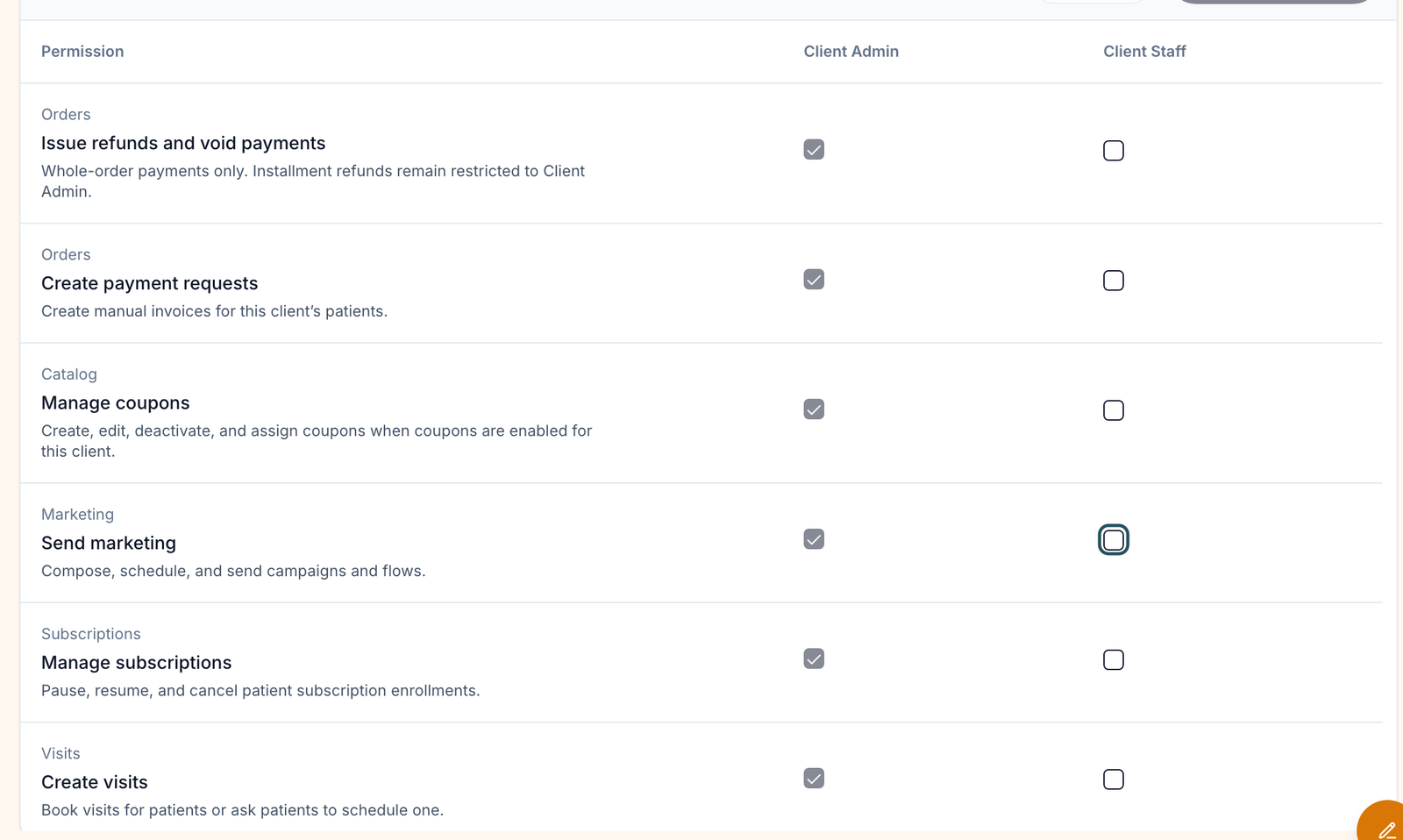
Left menu → Settings → Staff permissions. Tick Client Staff on the Send marketing row.
Save
Click Save permissions. It applies to every Client Staff member.
You'll know it worked when staff open /marketing and see Campaigns instead of Ask an administrator for marketing access.
Who can do this: Client Admin grants access. Client Staff use Marketing once granted.
Send an email or text campaign
Use this for a one-off announcement, promotion or newsletter.
Click New campaign
Top right, on Campaigns.
Write it
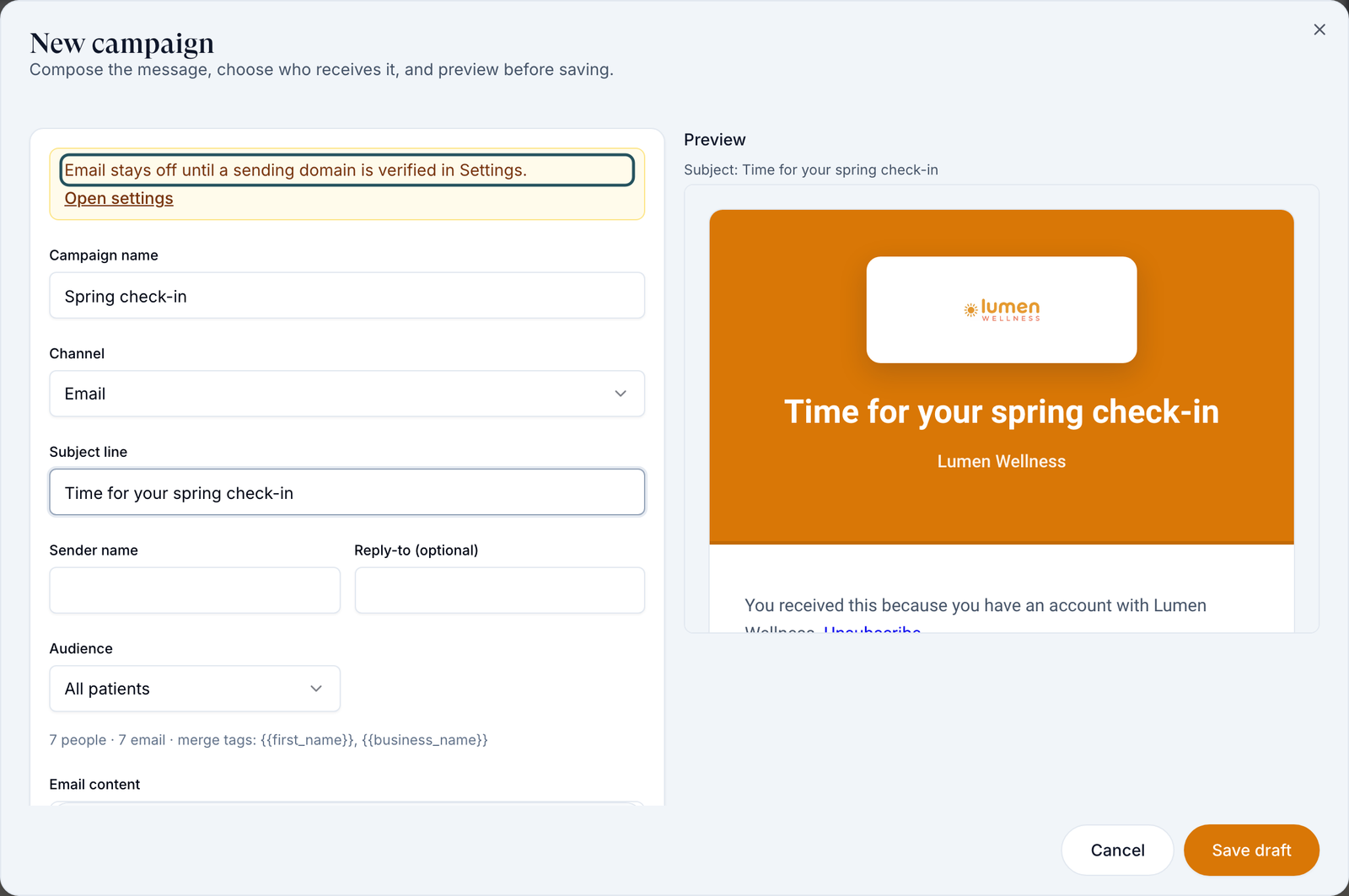
Fill in Campaign name, Channel (Email, Text message or Email and text), Subject line, Sender name and Reply-to (optional), then the message. {{first_name}} and {{business_name}} fill in each person's name and yours. Preview shows what people receive.
Choose who gets it
Audience: All patients, All staff, Everyone, By role or Picked people. The count under it shows how many people have an email or phone for the channel.
Save the draft
Click Save draft.
Send or schedule
On the draft's row, open ⋮ → Send. Pick a time in Schedule for (optional), or leave it empty, then click Send now (or Schedule).
You'll know it worked when the row's status reads Sending, then Sent (or Scheduled).
Who can do this: Client Admin; Client Staff with Send marketing.
Turn on an automated flow
Use this for messages that go out on their own, such as a follow-up after each visit.
Click New flow
Open the Flows tab, then New flow.
Choose the trigger
Name it, then pick the Trigger: After a visit, Birthday, Missed appointment, Inactive client or New client welcome. Set the days where asked (for example Days after visit).
Write it and turn it on
Choose the Channel, write the Subject line and message, switch on Turn this flow on, and click Create flow.
You'll know it worked when the flow shows on Flows as Active. Row ⋮ → Pause stops it.
Who can do this: Client Admin; Client Staff with Send marketing.
See who received a campaign
Click the campaign
On Campaigns. The window shows the Message and the Recipients.
Read each person's status
Each recipient reads sent, failed or skipped.
You'll know it worked when the Delivered column on the campaign row matches what you expect.
Who can do this: Client Admin; Client Staff with Send marketing.
Statuses you'll see here
| Status | What it means | Who acts next | What you do |
|---|---|---|---|
| Draft | Saved, not sent | You | Row ⋮ → Send, Edit or Delete |
| Scheduled | Sends at the time you set | Nobody | Row ⋮ → Cancel schedule to stop it |
| Sending / Sent | Going out, or done | Nobody | Nothing; it can't be pulled back |
| Active / Paused (flows) | The flow is running, or stopped | You | Row ⋮ → Pause or Turn on |
What can go wrong
| What you see | Why | Fix |
|---|---|---|
| Access denied / Ask an administrator for marketing access. | Client Staff without Send marketing | A Client Admin ticks it in Settings → Staff permissions. |
| Email stays off until a sending domain is verified in Settings. | Your email sending domain isn't verified | A Client Admin clicks Open settings → Branding and finishes Email sending domain. |
| Text stays off until GEN provisions an active phone number. | Your account has no texting number | Ask GEN Health in Support for a number. |
| No one currently matches this audience | Nobody in the audience has an email or phone for that channel | Change Audience or Channel. |
| Marketing isn't in the left menu | By design | Bookmark the address. |
Questions people ask
Can abandoned intake forms trigger an automatic email?
Not here. Flows cover visits, birthdays, missed appointments, inactive patients and new patients. Refill reminders are set on each product. For abandoned-intake or lapsed-subscriber messages, send events from Settings → Developers (webhooks) to your own email tool.
Is there a direct Customer.io (or other CRM) integration?
No. Connect it through webhooks or the API, for example via Zapier.
Can I unsend a campaign?
No. You can only Cancel schedule while it is Scheduled.
Do the emails use our branding?
Yes: they use your email theme from Settings → Branding and send from your verified domain.
Can we install Google Tag Manager on our intakes for tracking?
No; intake pages hold health information. Use webhook or API events for tracking.
Related
Was this helpful?