
Network setup
Forms
Your network's intake and consent forms: who owns which form, build a form with disqualifiers, attach it to protocols or categories, choose how long answers count, and make staff sign forms.
Forms holds your network's patient intakes and consents, which attach to protocols and apply to every client that sells them, plus forms your own staff and your clients' staff must sign. Left menu → Forms. Provider Network Admin; Providers and Provider Delegates can preview forms read-only.
Questions people ask
If we update a network-level intake form, does it change for all our clients?
Yes. For one client only, the client adds its own form on its Forms page.
How can we copy an intake form from one clinic to another?
You don't need to. Turn the protocol on for the other client and your intake comes with it.
Can the age disqualifier be set on all intake forms?
Set it once per form, on a Date question with Patient is younger than. A short form with Apply to All Patients covers everyone.
Can forms hide female-only questions from male patients?
Yes: Visibility → Add condition → Sex at birth in the question's side panel.
Can we delete a form patients already filled in?
Use Deactivate instead. Delete is permanent and breaks anything that points at the form.
Where to find it
Left menu → Forms. Choose Patient Intakes, Patient Consents, Provider Network Forms or Client Forms.
Who can use it: Provider Network Admin edits; Providers and Provider Delegates preview. Page: /forms.
What is on this page
| Control | Use it for |
|---|---|
| Build, Logic map, Preview | Switch between editing, the branching map and the patient preview. |
| Form settings | Set options for the whole form. On step-by-step forms, Patient experience → Display → Static shows one step at a time, replacing it with the next using your chosen entrance. |
| issues | Appears when something needs fixing before you save or publish. |
| Outline | Lists every question. Drag Resize outline or Resize side panel to change the panel widths. |
| Status badge | Shows Draft, Published, Unpublished or Archived below the form name. |
| Visibility / Answer logic | Choose who sees a question and which answers disqualify the patient or open follow-up questions. |
| Question text / Help text | Edit the wording in Build or Logic map. Help text holds the line below the question and its placeholder. |
| Answer source / Layout | For choice questions, choose Custom answers or Catalog, then choose how answers appear. |
| Answers | Open an answer to edit Answer text or choose Remove answer. New answer and Add answer add choices. |
| Text → Message to care team | Adds a long-text question. Its answer is posted to the patient’s care team in Messages when the visit is created. Blank answers are not sent. |
| Logic map | Hover an answer and drag its plus onto a step or product. |
| Preview a patient | Pick map answers and set Sex assigned at birth (Not set, Female, Male), age, height and weight. Steps the patient never sees are greyed out. |
| Reset answers and patient / Stop previewing | Clear the preview choices or close the preview panel. |
| AI is editing this form | The form assistant is working; the canvas stays locked until it finishes. |
What you can do here
- Know which forms are yours and which are the client's
- Build an intake or consent form
- Attach a form to protocols
- Choose how long answers count
- Make your staff or client staff sign a form
Know which forms are yours and which are the client's
Use this when a client asks who owns an intake, or wants one changed.
| Form | Who builds it | Who fills it in |
|---|---|---|
| Patient Intakes, Patient Consents | Your network, here | Patients of every client selling the protocol it's attached to |
| Provider Network Forms | Your network, here | Your providers and delegates |
| Client Forms | Your network, here | Client admins and staff at your clients |
| A client's own forms | The client, on its Forms page | Its patients, in addition to yours; the client can't remove your forms |
Editing a network form changes it for every client at once.
Build an intake or consent form
Use this for a new questionnaire or consent. The tab you're on decides the form type.
Start it
Open Patient Intakes or Patient Consents, click Add, then Create it on your own. Upload a PDF drafts one from a document; Duplicate in a row's menu copies one.
Name it
Click New Intake Form and type the name. Rename Section 1.
Add questions
Click Add question, pick a type from the menu (for example Radio or Date), type the question in the field at the top of the question's side panel (Type the question), add options, and switch on Required.
Stop ineligible patients
On a choice question, click the Disqualify when the answer is icon beside the answer that blocks the patient (hover it to read the answer's name); it then reads Disqualifies. Click it again to turn it off. On a Date question, open Disqualify when and pick Patient is younger than or Patient is older than.
Show questions to some patients only
Open Visibility in the question's side panel, click Add condition and pick Age or Sex at birth, or attach a follow-up question to one answer.
Preview and publish
Open Preview in the top bar, then click Publish. Choose Save draft to keep the form private.
Publish edits to a live form
On a published form, click Publish changes. There is no separate save; edits reach patients only after you publish them.
Take a form out of patient use
Open the arrow beside the publish button and choose Move to draft. Confirm Move this form to draft?, or choose Keep it published to back out. Publish it again when it is ready for patients.
You'll know it worked when the form shows Active in the list. A draft can't be attached to a protocol.
Who can do this: Provider Network Admin.
Attach a form to protocols
Use this so patients get the form when they buy a protocol. Every protocol needs an intake, or clients can't offer it.
Open the association
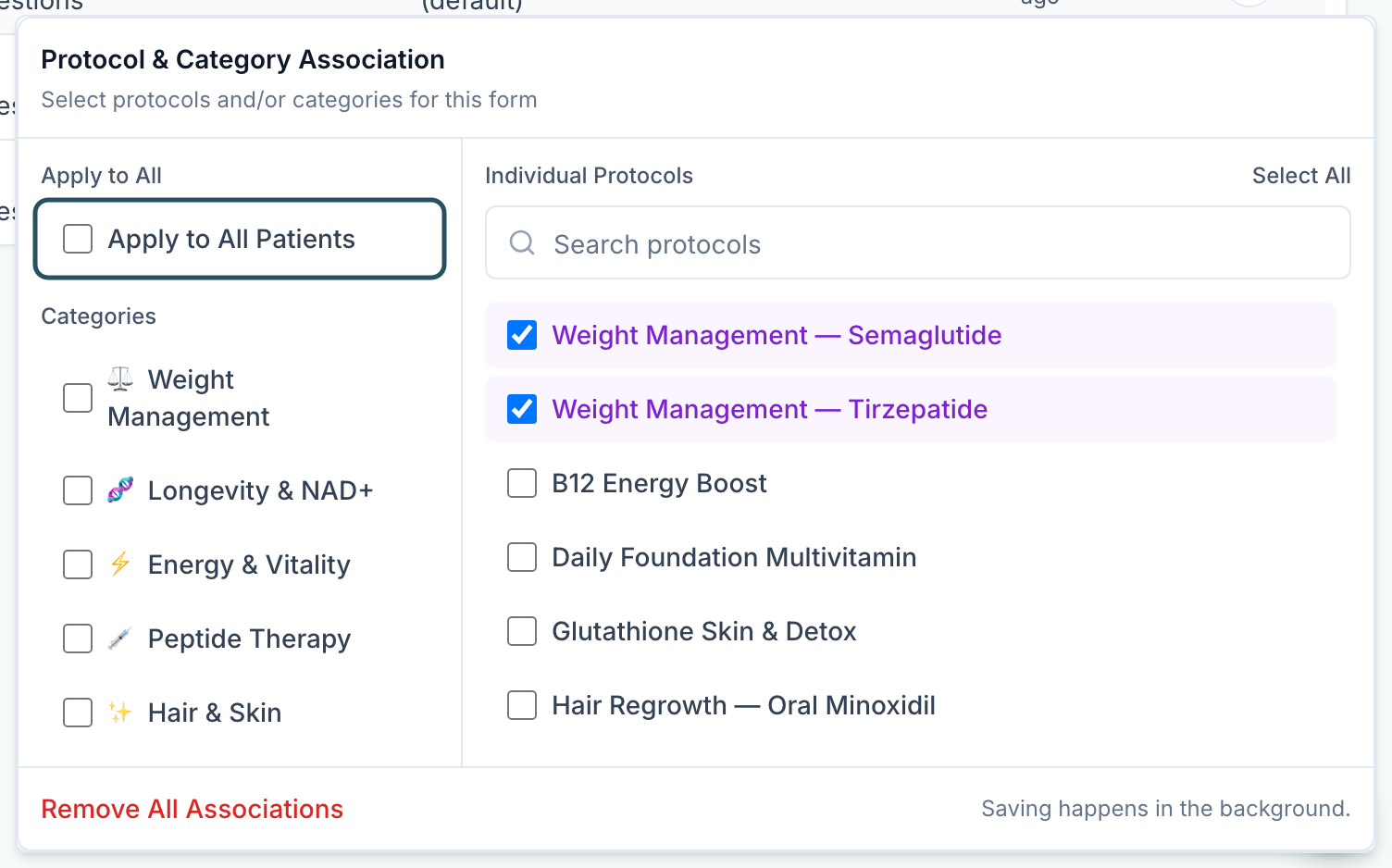
Click the form's Protocols cell (for example 2 protocols). Protocol & Category Association opens.
Pick what it covers
Choose Apply to All Patients, one or more Categories, or tick Individual Protocols. It saves in the background.
You'll know it worked when the cell shows the new count or All protocols. You can also attach forms from the protocol's Required forms.
Who can do this: Provider Network Admin.
Consents: attach a telehealth consent with Apply to All Patients so everyone signs it once, and product consents to their protocols. Signed forms are on the patient's profile, Forms tab.
Choose how long answers count
Use this so returning patients aren't asked the same questions too often, or are always re-asked.
Open Answer Reuse
Click the form's Answer Reuse cell (30 days (default)).
Pick a rule
Require every time, Platform default (30 days), or type days under Valid for a custom window and click Apply.
You'll know it worked when the toast reads Answer reuse updated and the cell shows the rule. Consents read Current version: a signature holds until you publish a new version.
Who can do this: Provider Network Admin.
Make your staff or client staff sign a form
Use this for agreements your providers or clients' staff must sign.
Create it on the right tab
Open Provider Network Forms or Client Forms and click Create Provider Network Form or Create Client Form. Build and publish it.
Choose who signs
Click Click to assign in Audience and pick Providers, Provider Delegates, Client Admin or Client Staff.
You'll know it worked when the Audience cell names the role. Until then nobody is asked to sign.
Who can do this: Provider Network Admin.
Every setting on this page
| Setting | Where | What it does |
|---|---|---|
| Question text | A question's side panel | The question patients read; type it here or on the form |
| Answer source | A choice question's side panel | Custom answers are choices you write; Catalog shows products, labs, or visits |
| Answer text | Answers, in an open answer | Renames the answer; it keeps its follow-ups and rules, and applies when you leave the field or press Enter |
| New answer | Answers | Wording of an answer to add with Add answer |
| Description | Answers, in an open answer, on a step-by-step form | An optional line under the answer |
| Help text | A question's side panel | A line shown with the question |
Statuses you will see
| Status | What it means | Who acts next | What you do |
|---|---|---|---|
| AI is editing this form | The form assistant is changing the form on the canvas; the canvas is locked meanwhile | The assistant | Wait for it to finish, then review the changes |
What can go wrong
| What you see | Why | Fix |
|---|---|---|
| Intake forms needed banner | A client has an active protocol with no intake, so it's hidden from them and their patients | Attach an intake to each protocol listed. The banner clears itself. |
| A form isn't in the list | The status filter starts on Active | Add Draft or Inactive to the filter. |
| A patient filled the wrong intake for a product | The form is attached by category or Apply to All Patients | Narrow the form's Protocols association. |
| A refill order has no new intake | Refills skip the first intake by design | Add a Clinical rules refill rule with Require forms on the protocol, or request a form from the patient's profile. |
| A disqualified patient can't continue and doesn't know why | A disqualifier matched their answer | Check the Disqualifies switches and any Disqualify when rule. Put what to do next in the question's Help text. |
| Drafts named New Intake Form pile up | The builder saves a draft as soon as you edit a form, even if you close it | Filter to Draft and Delete the ones you don't need. |
| Form must have at least one question | You clicked Publish on an empty form | Add a question, or Save draft. |
| The form assistant reads Your message was not sent. Your prompt and conversation are still here. Try again. | The request did not reach the assistant | Click Try again. |
| Saving a question to the profile reads Could not save this question to the patient profile., The question was removed before it could be saved to the profile. or Every suggested field key is taken. Create the field under Profile field. | The patient field could not be created or filled in, or the question was deleted while it saved. Your role may also lack permission to create patient fields (Your role cannot create patient fields.). | Try again, or pick an existing field under Profile field. When your role can create fields, the list ends with Create custom field…. If your role cannot create fields, ask an admin who manages patient fields to create one. |
| The builder's issues button lists Visibility rule is incomplete | A condition under Visibility has no value, or its age isn't a whole number from 0 to 130 (Finish every patient condition: pick a value, and use a whole age from 0 to 130.) | Finish or remove the condition; this blocks saving. |
| Uploading an image reads Save the form once, then upload images. | The form has no saved copy yet | Click Save draft, then upload again. |
| Moving a follow-up reads That follow-up already shows for this answer. | The follow-up is already set to show for the answer you moved it to | Pick a different answer. |
Next
Was this helpful?